
High Availability Deployment
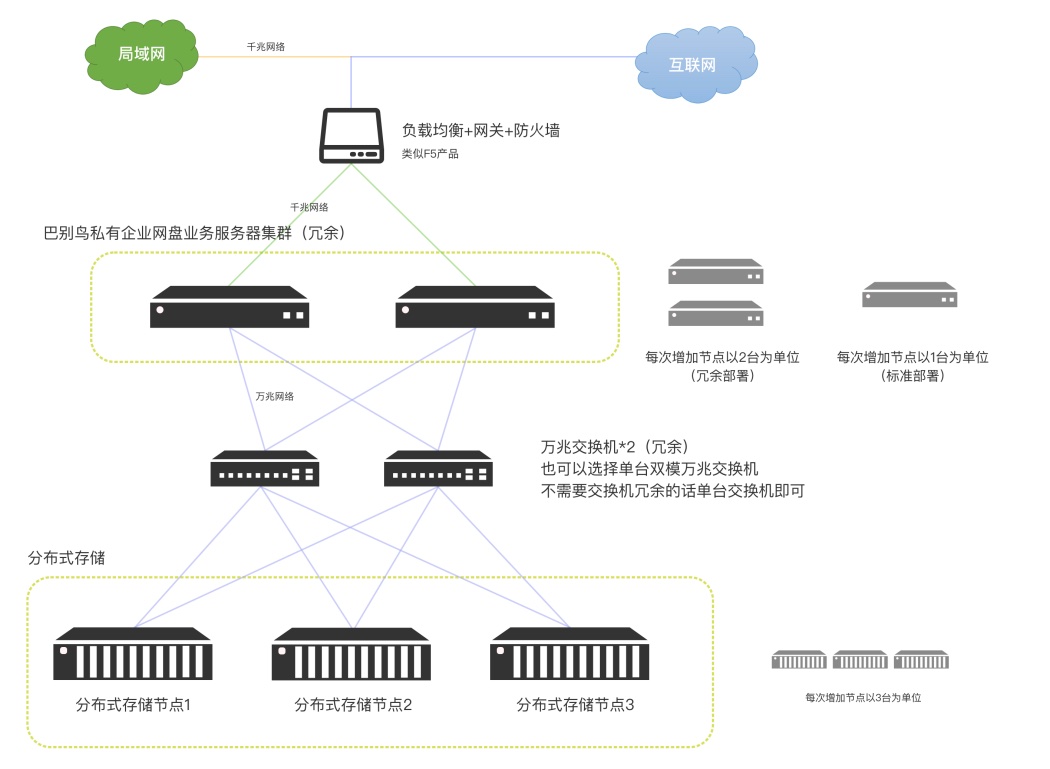
High availability deployment is designed for finance, healthcare, energy, large manufacturing, group companies, cross-region offices and scenarios where business continuity matters. The goal is not simply to buy more servers; it is to reduce single points of failure across access entry, application services, database, search, cache, transcoding, object storage, backup and network links, and to make recovery and failover verifiable.
Suitable Scenarios
| Scenario | Typical requirement |
|---|---|
| Core file platform | Upload, download, preview, approval, sharing and search cannot be interrupted for long |
| Multi-region offices | Users in different regions need stable access to the same file platform |
| Regulated industries | Stronger backup, audit, permission, security policy and disaster recovery design |
| Large asset, drawing and video data | Storage grows continuously and needs object storage and expansion planning |
| Private AI knowledge base | Vector index, OCR, GPU or model services are required in addition to the file platform |
Architecture Layers
High availability should be designed by service layer. A single larger server is not a substitute for redundancy.
| Layer | Recommended design |
|---|---|
| Access entry | Use load balancer, reverse proxy, dual network links or cloud load balancing for HTTPS entry |
| Application services | Prepare at least primary and standby application nodes; larger deployments can use multiple replicas |
| Database | Use primary-replica, active-standby or database cluster; verify restore procedures regularly |
| Search service | Deploy full-text and advanced search separately; use a cluster for larger scale |
| Cache and queue | Redis, task queues and async workers should be monitored and recoverable |
| Transcoding and preview | Office, CAD, video and image conversion can be deployed independently and scaled by workload |
| Object storage | Use single-server, active-standby or distributed object storage for file bodies |
| Backup and DR | Database, object storage, configuration and indexes need local backup, offsite backup or DR |
Recommended Deployment Forms
| Scale | Recommended form | Notes |
|---|---|---|
| 100-1000 users | Dual applications, dual databases, independent search, optional transcoding, S3/OBS or shared storage | Balances cost and availability for smaller but interruption-sensitive enterprises |
| 1000-5000 users standard HA | Primary/secondary application, primary/secondary database, independent search, independent transcoding, object storage | Suitable for most medium and large private deployments |
| 1000-5000 users on K8S | 3-5 application replicas, database HA, search cluster, Redis cluster, S3 object storage | Suitable for enterprises with a container platform and operations team |
| 1000-5000 users + AI | Add AI/OCR/vector servers beyond the HA document platform | AI compute can use external compute platforms or private GPU servers |
| 10k-50k users | Higher-spec active-standby applications, database, search, transcoding and independent storage | Requires dedicated assessment of concurrency, regions, bandwidth, file count and AI scope |
Server Role Guidance
The following is a common HA role split. Final sizing depends on user count, concurrency, file volume, storage capacity, preview workload, AI modules and network conditions.
| Role | Reference configuration | Purpose |
|---|---|---|
| Primary application server | 16-core CPU, 64GB memory, 500GB SSD system disk | Web, APIs and main application services |
| Secondary application server | 16-core CPU, 64GB memory, 500GB SSD system disk | Standby, active-active or application replica node |
| Primary database server | 8-core CPU, 32GB memory, 500GB SSD system disk | Business data writes and transactions |
| Secondary database server | 8-core CPU, 32GB memory, 500GB SSD system disk | Replication, backup and failover |
| Search server | 8-core CPU, 32GB memory, 1TB SSD system disk | Full-text index, OCR text and advanced search |
| Transcoding server | 8-core CPU, 16GB memory, 200GB system disk | Office, CAD, image and video preview conversion |
| Object storage server | 16-core CPU, 64GB memory, 500GB SSD system disk plus data disks | File bodies through S3, NFS or distributed object storage |
| AI/OCR server | 8-32 CPU cores, 32-128GB memory, GPU depending on model | Private OCR, vectors, knowledge bases and model inference |
K8S High Availability
Enterprises with an existing container platform can deploy on K8S. K8S is best for teams that already operate Ingress, StorageClass, observability, logs and image registries. It makes application replicas, resource quotas, rolling upgrades and failover easier to manage.
| Workload | Suggested replicas | Resource reference |
|---|---|---|
| Application services | 3-5 replicas | 4-8 CPU cores and 16-32GB memory per replica |
| Database | 2 replicas or external database | Primary-replica or active-standby with SSD storage |
| Search engine | 3-node cluster | 4-8 CPU cores, 16-32GB memory and SSD per node |
| Redis cache | 3 nodes | Size memory by concurrency and task volume |
| Object storage | S3/OBS/OSD | Store file bodies in independent object storage, not application pods |
Object Storage And File Availability
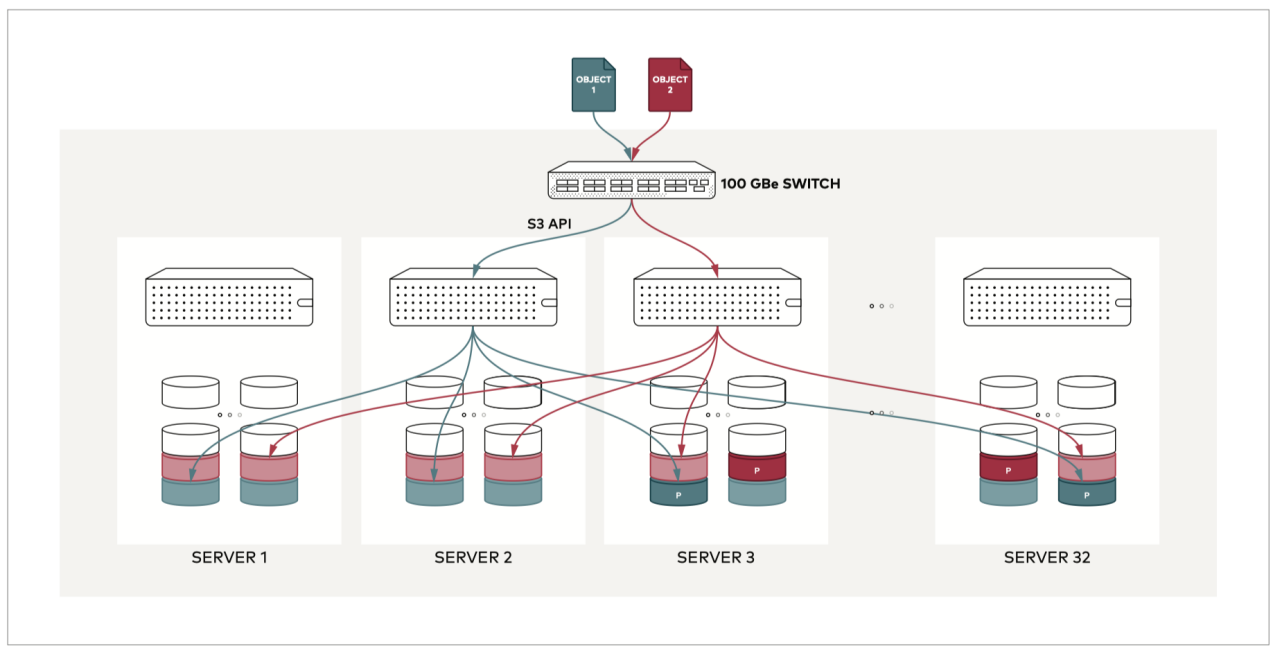
File-body availability is often more important than application availability because application servers can be rebuilt while file data cannot be lost. BabelBird supports S3-compatible object storage, cloud object storage, NFS, VM-mounted disks and self-built object storage. For HA deployments, object storage is recommended.
Confirm these points during design:
- Usable capacity versus raw capacity depends on erasure coding or redundancy strategy.
- Storage node count, disk count per node, disk capacity and future expansion unit.
- Network bandwidth, latency and isolation between object storage and application servers.
- Whether active-standby object storage, offsite sync or object-storage-level DR is required.
- Whether existing S3 storage, cloud OBS/OSS/COS or hyperconverged storage can be connected.
For capacity, erasure coding, usable space and hardware preparation, see Object Storage And Erasure Coding.
Backup And Disaster Recovery
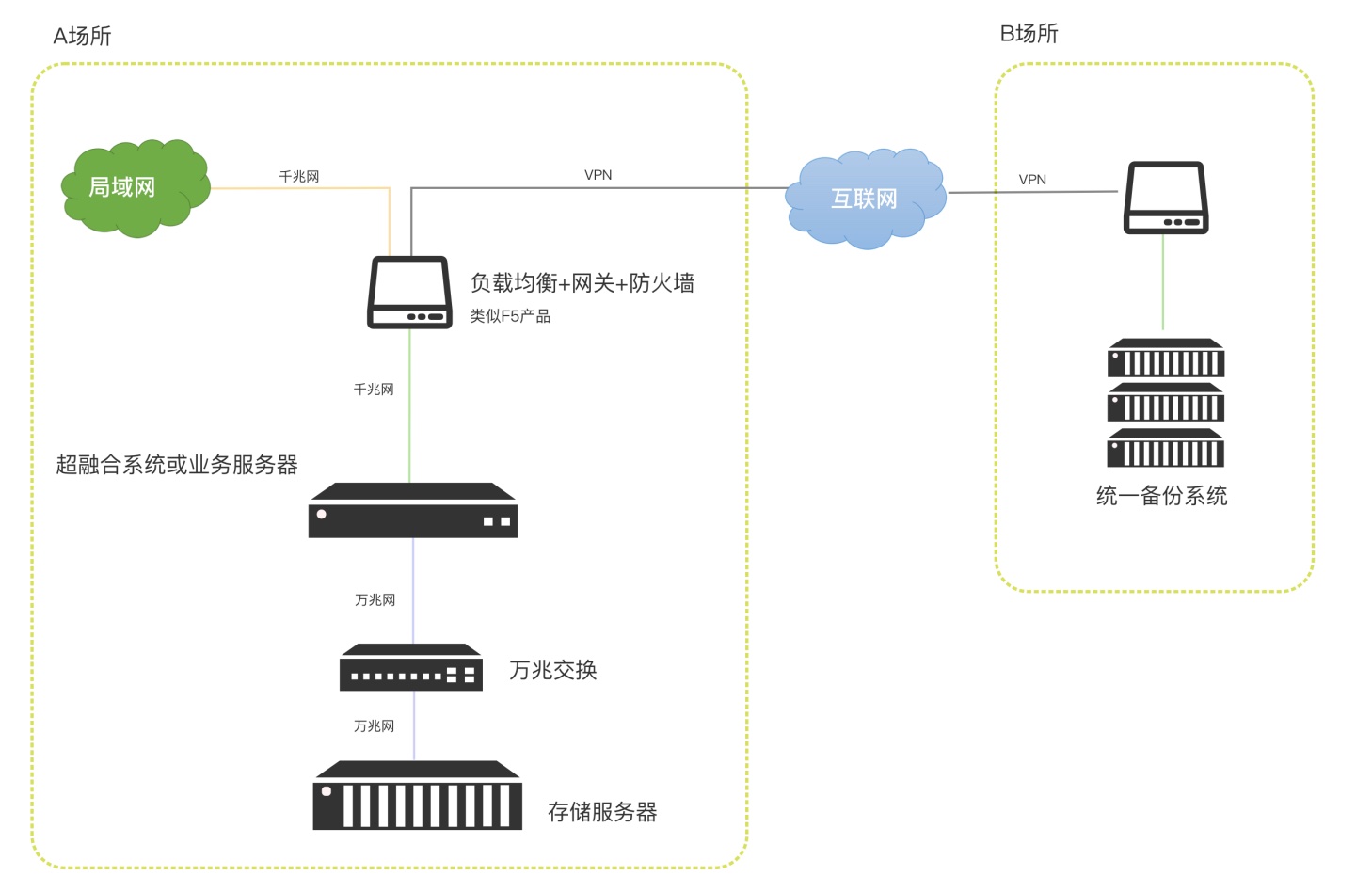
High availability reduces service interruption during failures. Backup and disaster recovery ensure data can be restored. They are not substitutes for each other. Even with active-standby or cluster deployment, an independent backup strategy is still required.
| Data type | Recommendation |
|---|---|
| Database | Regular full and incremental backup plus restore drills |
| Object storage | Object storage sync, backup server or third-party backup system |
| Search index | It can be rebuilt from files and database, but rebuild time must be evaluated |
| Configuration and certificates | Back up domain certificates, system configuration, license files, mail and integration settings |
| Logs and audit | Retain access logs, operation logs and security audit logs according to compliance requirements |
Overseas And Cross-Region Notes
- Choose a cloud region, data center or object storage region close to primary users.
- For public access, evaluate international bandwidth, CDN, DNS, certificates and cross-border link stability.
- When using cloud object storage, keep it in the same region or private network as application servers where possible.
- Cross-region DR should verify dedicated lines, VPN or cloud network quality to avoid sync backlog.
- Third-party SSO, email, SMS, AI API or license services should be tested from the target region in advance.
Pre-Launch Checklist
- Verify that access can switch to the standby application node when the primary node fails.
- Verify database replication, backup and restore procedures, not only backup file existence.
- Verify read/write behavior when an object storage node, disk or network path fails.
- Verify recovery of search, preview, transcoding, OCR, AI and automation queues.
- Verify certificates, domains, load balancers, reverse proxies and internal/external access policies.
- Verify that backups can restore a usable system in an isolated environment.
- Monitor CPU, memory, disks, object storage, database, search, queues, certificate expiry and backup results.